Office Ally Practice Mate: Features and How It Works

Office Ally Practice Mate (often searched as Office Ally PM) is a free, cloud-based practice management system for -scheduling, billing, and claims, built for solo and small group practices, separate from Office Ally's EHR, and it is one of several products Office Ally sells under the same brand name, which is exactly why "Office Ally" and "Practice Mate" get confused in search as often as they do.
This post explains what Practice Mate actually does, how a claim moves through it, where it sits next to Office Ally's other products, and what it handles well and where it falls short, based on the vendor's own documentation and 184 verified user reviews on SoftwareFinder.
Key Takeaways
- Practice Mate is Office Ally's free practice management software: scheduling, billing, claims, and reporting. It is not the same product as Office Ally's EHR, called EHR 24/7.
- "Free” means no monthly subscription fee, with transactional fees and add-ons priced separately.
- SoftwareFinder's 184 verified user reviews show strong marks for ease of use and cost, with limits around performance at high claim volume and reporting flexibility.
- Practice Mate tracks and flags denials, and people work them. That gap is where a dedicated billing team member still matters.
What Office Ally Practice Mate Is and Who It's For
Practice Mate is Office Ally's practice management software: a scheduling, billing, and claims system that runs in a browser, with no software to install. Office Ally's own description is specific about what it covers: scheduling patients, capturing insurance information, managing accounts, and tracking the revenue cycle. Clinical charting and SOAP notes sit in a separate Office Ally product, EHR 24/7.
Office Ally markets Practice Mate toward independent practices and small groups, and the user base backs that up. Independent review data shows it is used across general surgery, neurology, family practice, rheumatology, internal medicine, emergency medicine, and especially mental health and therapy practices, where billing involves multiple payers but clinical documentation needs tend to be simpler. Office Ally says Practice Mate is used by over 25,000 healthcare organizations.
Core Features
Practice Mate's core, no-monthly-fee feature set covers four areas:
Scheduling. Appointment booking by provider, location, or resource, with daily, weekly, and monthly calendar views, built-in scheduling alerts, and support for multiple providers and locations in one account.
Patient billing and superbills. Configurable superbills let a practice build charge entry around its own service codes, with a patient ledger that tracks balances per patient.
Claims management. Claims are submitted through Office Ally's own integrated clearinghouse, with acknowledgment and status tracking built into the same system.
Reports. Built-in reporting on scheduling patterns, collections, and revenue cycle performance.
Several frequently-used features are not part of the free core and are sold as separate add-ons: Insurance Discovery (identifying hidden coverage for self-pay patients), Intake Pro (digital pre-visit intake forms), Patient Ally (a patient portal), Reminder Mate (automated appointment reminders), and Statement Mailing (automated patient statements). A practice evaluating Practice Mate as "free" should know upfront that several of the features most practices actually want day to day sit behind this add-on line, not inside the base product.
How a Claim Flows From Charge Entry to Posting
A typical claim moves through Practice Mate in roughly this order:
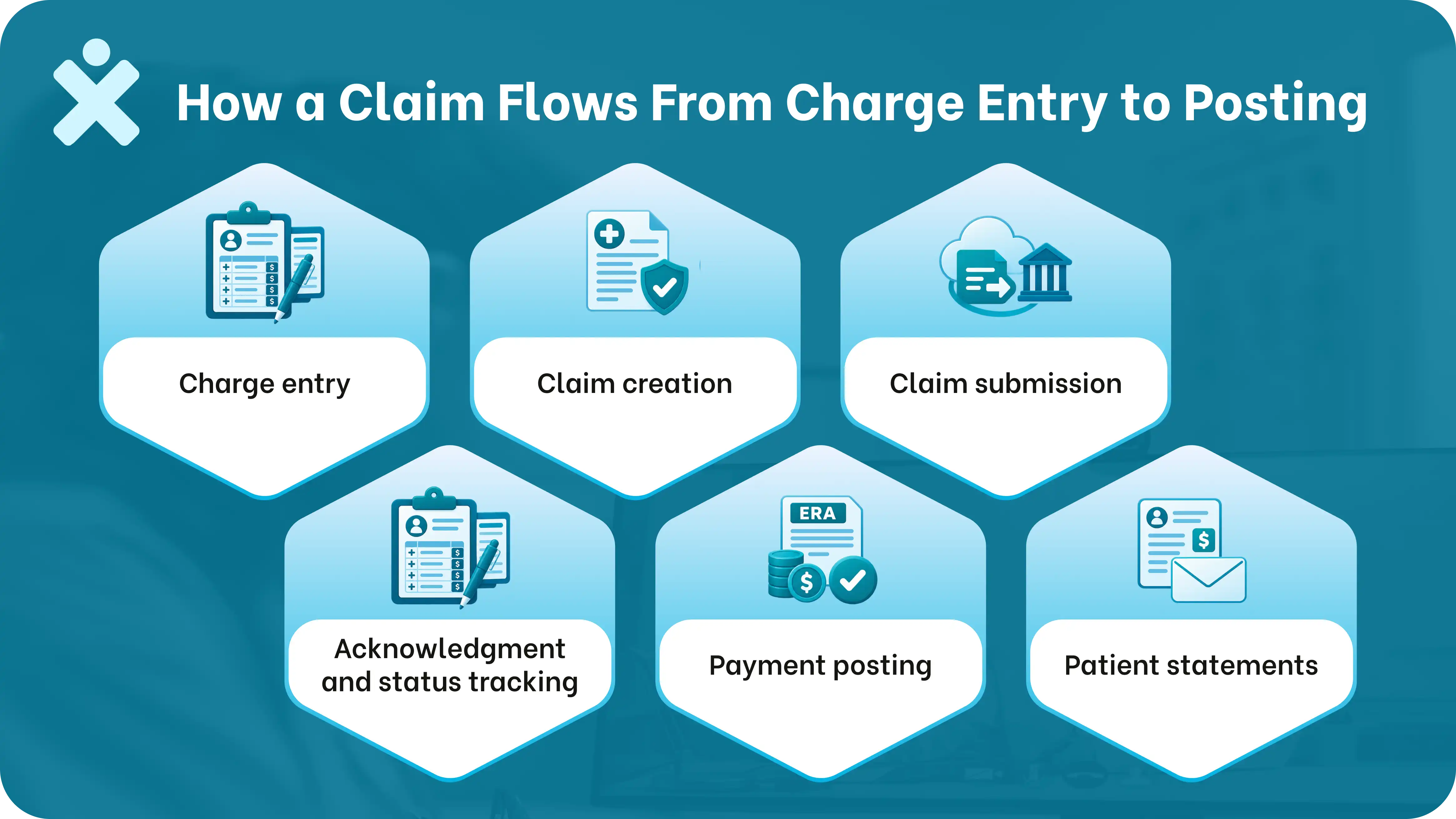
- Charge entry. Using a configurable superbill, staff enter the charges for a completed visit.
- Claim creation. Practice Mate builds a claim from those charges, formatted for the specific payer.
- Claim submission. The claim goes out through Office Ally's integrated clearinghouse rather than a separate submission step.
- Acknowledgment and status tracking. Practice Mate tracks whether the payer has acknowledged, is processing, or has responded to the claim.
- Payment posting. Electronic remittance advice (ERA) gets posted against the claim and the patient ledger.
- Patient statements. Any remaining patient balance can go out as a statement, either printed or through the Statement Mailing add-on.
This flow covers submission and tracking well. A person works each denial once one happens, reading the denial reason, correcting the claim, and resubmitting it, which is covered further down.
Office Ally Practice Mate vs. Office Ally's Other Products
A lot of the confusion behind "Office Ally" searches comes down to one fact: Office Ally is the parent brand, and it sells several different products under it, with different pricing models.
A practice that signs up expecting one unified "Office Ally" system may be surprised to learn that clinical charting is a separate paid product (EHR 24/7), while the practice management and clearinghouse pieces (Practice Mate and Service Center) are free.
Knowing this upfront avoids a confusing sales conversation later.
If you are weighing Practice Mate against a paid system, see our AdvancedMD comparison.
Strengths and Limits
Based on Office Ally's own documentation and SoftwareFinder review data from 184 verified Practice Mate users, the pattern is fairly consistent.
Where it holds up well. Ease of use scored strongly positively (roughly 80% of reviewers), as did value for money (roughly 85% positive), with users specifically citing the ability to bill both participating and non-participating payers at no cost. Customer support also scored well, with live chat and phone support both drawing consistent praise for responsiveness.
Where it struggles. Performance under volume is the most consistently cited weakness, with a majority of reviewers reporting slower load times and lag specifically when processing high volumes of claims or posting payments. Reporting flexibility is another recurring limit: built-in reports often require exporting to Excel and manually filtering, since the in-platform filtering options are limited. Some reviewers also reported occasional claim submission errors, including claims that appeared to submit but did not.
A specific cost detail worth knowing. Office Ally applies a $44.95 fee per unique Tax ID and Rendering NPI combination in any month where 50% or more of that combination's claims go to non-participating payers, which matters for practices with a heavy out-of-network mix.
Practice Mate suits its intended audience. It is built and priced for solo and small practices that need scheduling and billing, not high-volume claims processing at scale, and the independent review data reflects exactly that trade-off.
Getting Started
Office Ally covers account setup and registration directly; see our separate guide to registering for Office Ally for that process. This post is focused on what the software does once it's running, not the signup steps themselves.
What Still Needs a Human: Denials and Follow-Up
Practice Mate tracks a claim's status and flags when a payer has responded. A person reads the denial reason, decides how to correct the claim, and follows up with the payer until the resubmission is resolved. That is deliberate; a practice management system is built to move a clean claim through a workflow, not to argue a denial back to payment.
For a solo or small practice already running lean, that denial-management gap is exactly where billing backlogs build up. A dedicated Medical Billing Virtual Assistant from MedVirtual can own that specific gap: working denials inside your existing billing system, correcting and resubmitting claims, and following up with payers until a claim is actually paid, not just submitted.
Office Ally Practice Mate Needs Backup
Office Ally Practice Mate handles the scheduling-to-claim pipeline cleanly for a small practice. A person still works each denial once one happens, and that gap tends to show up exactly when claim volume grows past what the free tier was built for.

Talk to our team about a dedicated billing virtual assistant who works inside your existing billing system.
Your Guide To Common Questions & Solutions